ANIME-GAN for JETSON
Running generative models like AnimeGANv2 smoothly on edge devices requires optimization. The Jetson Orin Nano (8GB) is a capable board, but traditional PyTorch inference can be memory-heavy and slower than necessary. To maximize performance and efficiency, converting the PyTorch model to an optimized TensorRT engine is the way to go.
This guide walks through the process of taking AnimeGANv2 from PyTorch to ONNX, and finally to a highly optimized TensorRT engine for inference on the Jetson Orin Nano.


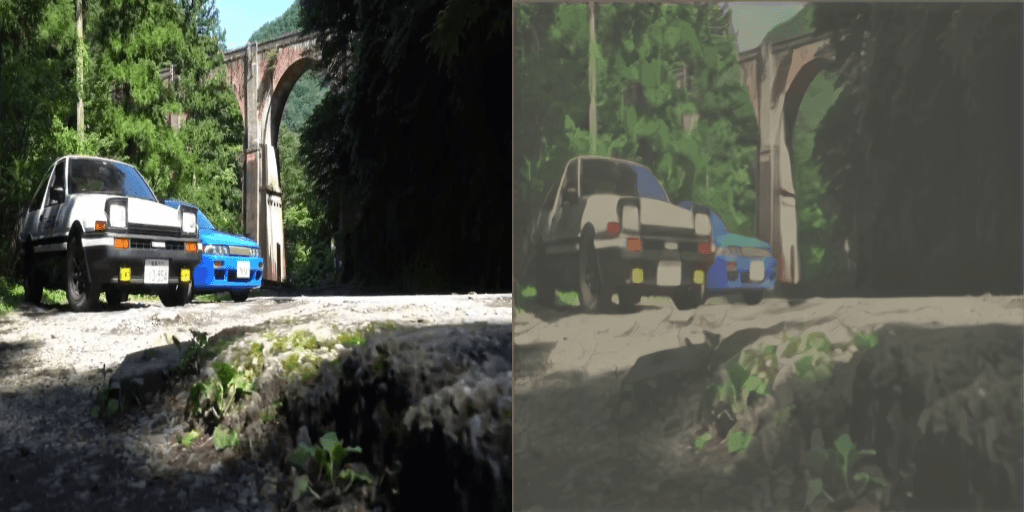
- Environment Setup: Using Docker to ensure a clean and reproducible environment.
- PyTorch to ONNX: Exporting the PyTorch model (
.pt) to an Intermediate Representation (ONNX). - ONNX to TensorRT: Compiling the ONNX model into a device-specific TensorRT engine (
.engine), leveraging FP16 precision. - Inference: Running the optimized engine using PyCUDA and TensorRT in Python.
1. Environment Setup
To keep dependencies clean, especially when dealing with CUDA, TensorRT, and PyTorch on Jetson, using Docker is highly recommended. It also makes the process much more reproducible.
First, build the Docker image (ensure you have a Dockerfile set up with the necessary L4T base and dependencies):
docker build -t ur-image:v1 .Then, run the container, ensuring you pass necessary privileges for GPU and display access:
sudo docker run -it --rm --net=host \
  --runtime nvidia \
  -e DISPLAY=$DISPLAY \
  -v /tmp/.X11-unix/:/tmp/.X11-unix \
  -v ~/work:/workspace \
  ur-image:v1
- If you encounter errors due to the NumPy version (especially in JetPack 5.1.2), it is likely because newer NumPy versions have deprecated certain type aliases. You can resolve this by modifying the TensorRT initialization file.
              import numpy as np
              mapping = {
                float32: np.float32,
                float16: np.float16,
                int8: np.int32,
                bool: bool,
                uint8: np.uint8,
              }
              ...
a) About Dockerfile
FROM nvcr.io/nvidia/l4t-jetpack:r35.4.1

ENV DEBIAN_FRONTEND=nointeractive
ENV PYTHONUNBUFFERED=1

RUN apt update &&  apt install -y --no-install-recommends  vim  python3-pip
libopenblas-base  libjpeg-dev  zlib1g-dev  libwebp-dev  git  cmake &&
 rm -rf /var/lib/apt/lists/* &&     pip install onnx pycuda

WORKDIR /workspace
COPY . .

RUN wget https://developer.download.nvidia.cn/compute/redist/jp/v512/pytorch/torch-2.1.0a0+41361538.nv23.06-cp38-cp38-linux_aarch64.whl &&     pip install torch-2.1.0a0+41361538.nv23.06-cp38-cp38-linux_aarch64.whl &&     rm torch-2.1.0a0+41361538.nv23.06-cp38-cp38-linux_aarch64.whl
RUN git clone --branch release/0.16 https://github.com/pytorch/vision torchvision &&     cd torchvision &&    pip install . -v --no-build-isolation &&    cd ../ &&    rm -rf torchvision
CMD ["/bin/bash"]
Built on JetPack 5.1.2, this project leverages a Jetson-optimized Docker image from NVIDIA NGC. The GAN implementation is adapted from the official AnimeGAN2 source code.
ㄴ Refer to NGC catalog | AnimeGAN22. Converting PyTorch to ONNX
The first conversion step takes the PyTorch weights and exports them to ONNX format. This creates a computational graph that is independent of the PyTorch framework.
Assuming you have a script named onnx_convert.py that loads your generator model, you run:
python3 onnx_convert.py --model ./weights/paprika.pt --output ./weights/model.onnxThe script initializes the PyTorch model, loads the .pt weights, and uses torch.onnx.export. Crucially, dynamic axes are often defined so the model can handle different batch sizes or image resolutions later:
# Snippet from onnx_convert.py
x = torch.randn(1, 3, 256, 256, requires_grad=True).to(device)
torch.onnx.export(
    net, x, args.output,
    export_params=True,
    input_names=['input'], output_names=['output'],
    dynamic_axes={
        'input' : {0: 'batch_size', 2: 'height', 3: 'width'},
        'output': {0: 'batch_size', 2: 'height', 3: 'width'}
    }
)
3. Building the TensorRT Engine
TensorRT takes the ONNX graph and optimizes it specifically for the Orin's GPU architecture.
We use the trtexec command-line tool, which is included with TensorRT installations on JetPack.
trtexec --onnx=model.onnx \
        --saveEngine=model.engine \
        --minShapes=input:1x3x64x64 \
        --optShapes=input:1x3x256x256 \
        --maxShapes=input:1x3x512x512 \
        --fp16
Key Parameters:
--minShapes, --optShapes, --maxShapes: Because we exported the ONNX model with dynamic axes, we must tell TensorRT the expected range of input dimensions to optimize for.--fp16: Critical for Jetson Orin Nano! This instructs TensorRT to use 16-bit floating-point precision where possible instead of 32-bit. This drastically reduces memory footprint and increases inference speed with minimal, often imperceptible, impact on the output image quality.
4. Inference with TensorRT and PyCUDA
Once model.engine is generated, PyTorch is no longer needed for inference. We use the TensorRT Python API and PyCUDA to handle memory transfers.
Here is an overview of how the inference script (engine_test.py) works:
- Deserialize the Engine: Load the
.enginefile into the TensorRT runtime. - Allocate Memory: Use pycuda to allocate memory buffers on the GPU for both the input image and the expected output.
- Preprocessing: Standardize the image (RGB, normalize using dataset mean/std) and copy it from Host (CPU) to Device (GPU).
- Execute: Run the TensorRT context asynchronously.
- Postprocessing: Copy the result back from Device to Host, un-normalize, and save as an image.
You run it simply by executing:
python3 engine_test.pyConclusion
By converting the PyTorch implementation of AnimeGANv2 to TensorRT using FP16 precision, the model becomes significantly more lightweight and faster, making it perfectly suited for edge deployment on the Jetson Orin Nano (8GB). This pipeline allows you to process images (and potentially video frames) efficiently while staying within the memory constraints of edge AI devices.